Search

Enroll your ecobee smart thermostat in Power Response Smart Home with eco+
Easy setup. Just follow the steps below to get started.
Learn more about our Power Response program.


Your ecobee thermostat is your entry point into Power Response Smart Home. By enrolling, you let CPA make small, automatic adjustments during peak demand.
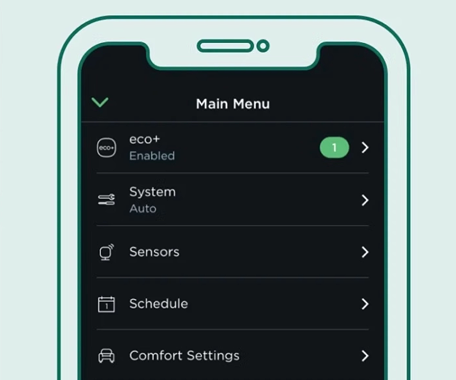
Open your ecobee mobile app. If you haven’t already, set up eco+ for your home. If you have eco+, select it from the main menu.
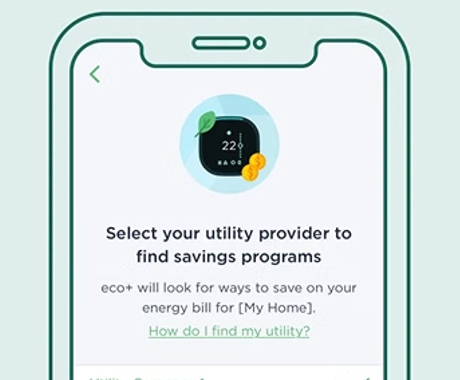
In the eco+ menu, enable the Community Energy Savings feature and select Clean Power Alliance.
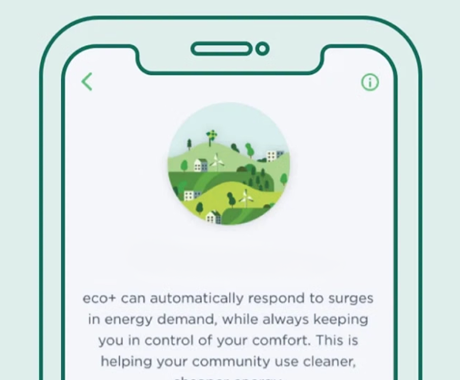
A message about Power Response will appear on the screen, including the incentive and the program terms and conditions. Select “Ok” to enroll in the program.
Learn how Energy Savings Events work, what you earn, and how enrolled thermostats respond during peak events.
For assistance enrolling, please call the CPA Power Response Program at 877-526-1589 or email us at support@cpapowerresponse.org
Jess serves as the Customer Care Manager at Clean Power Alliance. She has a unique background consisting of 7 years of data management experience at Calpine Community Energy, directly supporting CCA’s as an Operations Supervisor. While at Calpine, Jess was responsible for managing the day-to-day operations of SCE CCA’s, including billing, analyses, customer service, program implementation and creating efficiencies and controls. Prior to that, she worked in Finance for 11 years, managing customer service, accounts receivables and grant funding allocation for an online university. Jess graduated from Grand Canyon University, earning a Master of Science degree in Psychology and holds a Bachelor of Arts degree in Business Administration.
Miguel serves as Senior Associate, Integrated Marketing at Clean Power Alliance, supporting efforts to build brand awareness and connect customers with CPA’s programs and services. He brings experience in brand strategy, audience research, and integrated marketing across digital advertising, social media, television, and direct mail. Prior to joining CPA, Miguel worked at Rocket, where he helped shape strategy and messaging for national campaigns, including work tied to the Super Bowl. His experience spans campaign planning and creative development, with a focus on translating audience insights into clear, compelling communications. Miguel’s approach emphasizes making complex products and services accessible and relevant to the people they serve. He earned a Bachelor of Arts in English from Loyola Marymount University.
Eric serves as CPA’s Engineer, Cloud Security, helping protect the data and cloud environments that support CPA’s operations. He is a cybersecurity professional with eight years of experience across healthcare and managed security services. Prior to joining CPA, Eric worked with multiple managed security service providers, providing threat detection and security monitoring services to organizations across a variety of industries. Eric brings a broad range of cybersecurity knowledge and hands-on experience to CPA’s security team, with a focus on strengthening the organization’s overall security posture. He holds a Bachelor’s degree in Cybersecurity from Franklin University.
Kelly Charles serves as a Senior Project Manager, Infrastructure Delivery, supporting the development and construction of resiliency projects for local government programs. Kelly holds a B.S. in Chemical Engineering from the University of Pittsburgh and is a NABCEP certified PV Installation Professional. She has almost a decade of experience in C&I solar and storage, both in front-of and behind- the meter. Prior to CPA, she served as an Associate Director for a C&I developer and EPC, building solar and storage projects across the United States. She started her career in solar as an Americorps fellow for Grid Alternatives.
Lara serves as Administrator, Communications and Marketing at Clean Power Alliance, providing administrative and operational support to the Communications and Marketing team. Lara brings over a decade of experience in administrative and financial operations across public agency and corporate environments, with expertise in budget development and monitoring, vendor coordination and contract administration, project coordination, and organizational systems management. Prior to joining CPA, Lara served as Administrative Officer at the South Bay Cities Council of Governments (SBCCOG), where she managed a $7.8M agency-wide budget, administered 28 grants and contracts, oversaw procurement operations, and implemented organizational systems that improved efficiency and operations across the agency. Prior to that, Lara was a Management Analyst, Finance at the City of Costa Mesa and an Operations Manager, Corporate Services at Oaktree Capital Management. Lara holds a Master of Arts in Management from Azusa Pacific University and a Bachelor of Arts in Sociology from California State University, Long Beach.
Rudy serves as Associate, Integrated Marketing at Clean Power Alliance. He is a multicultural marketing strategist with experience developing and executing integrated, multilingual marketing campaigns that connect diverse audiences to essential services and resources across Southern California. Throughout his career, he has supported nonprofit, healthcare, and mission-driven organizations, leading campaigns that span digital, television, radio, out-of-home, email, and direct mail, with an emphasis on delivering clear and culturally relevant messaging that drives awareness, engagement, and enrollment. A Los Angeles native from West Adams, he is committed to advancing community impact through strategic communications, storytelling, and audience-centered marketing campaigns. Rudy earned his MBA with a concentration in Project Management from Mount Saint Mary’s University and a B.A. in Political Science from California State University, Northridge.
Scott Nicholson serves as Advisor, Energy Markets & Optimization on the Power Supply team. He supports portfolio management, assesses market policy updates, guides CRR strategy, and onboards new resources to advance CPA’s clean energy, reliability, and affordability objectives. He has more than a decade of experience in the renewable energy space in both research and consulting roles. Prior to joining CPA, Scott spent four years at Ascend Analytics, performing integrated resource planning, procurement evaluations, and portfolio management for utility and CCA clients. Prior to that, he spent seven years leading research on energy consumption in industrial supply chains at the National Renewable Energy Laboratory. He holds a Master of Science in Mineral and Energy Economics from the Colorado School of Mines and a Bachelor of Science in Chemical Engineering from Tufts University.
Jennifer Gorman serves as a Project Manager, Local Government Programs for Clean Power Alliance. She supports the development, implementation, and evaluation of programs that support adoption of clean energy technologies for CPA’s local government members. Prior to joining Clean Power Alliance, Jennifer worked as a Consultant and Business Development Manager at Strategen Consulting where she supported clients across their clean energy planning and regulatory innovation practice areas. She has also held internships at the Luskin Center for Innovation working on policy and planning at the water-wildfire nexus; at American Honda Motor on their Sustainable Business Development team; and at the U.S. Climate Alliance supporting their industrial decarbonization and electricity policy domains. Jennifer holds an M.P.P. from UCLA and a B.S. in Chemical Engineering from UC Berkeley.
Abel Debela serves as Data and Systems Architect with extensive experience in big data solutions and the design of scalable data pipelines for data lakes and data warehouses. He specializes in data integration and automation, with a strong focus on interpreting, analyzing, and reconciling heterogeneous data to deliver meaningful insights through effective data visualization. He has worked extensively with AWS and Azure cloud platforms and brings hands-on expertise in PySpark and leading visualization tools, including Tableau, Power BI, and AWS QuickSight. Abel’s industry experience spans finance, aviation, and public utilities, giving him a well-rounded perspective across diverse business environments. Abel holds a Master’s degree in Advanced Business Analytics from the University of Washington.
Chloe Taurel serves as Analyst, Load Forecasting for Clean Power Alliance. Chloe works on maintaining load forecasting models, ensuring the accuracy of forecast inputs and outputs, and developing standardized reports and dashboards. Prior to joining Clean Power Alliance, she interned at the Michigan Green Building Collaborative, where she analyzed energy trends and benchmarked building efficiency data. She has also conducted research with the Energy Equity Project on energy affordability in historically redlined communities in Michigan and developed an ETL pipeline to centralize energy regulatory data. Chloe earned her Bachelor of Science in Data Science with minors in Energy Science & Policy and Sustainability from the University of Michigan.
Siddharth “Sid” Mathew serves as Project Manager, Settlements at Clean Power Alliance, where he supports accurate and efficient wholesale market settlements through data validation, discrepancy resolution, and contract performance review. He collaborates with internal teams and external partners to ensure settlement outcomes align with market activity and contractual requirements. Prior to joining Clean Power Alliance, Sid was a Senior Energy Analyst at Ascend Analytics, serving as lead analyst and primary client contact for modeling, valuation, and market analysis projects. His work included validating CAISO, MISO, and SPP market data; analyzing DA/RT prices, forward curves, and generation performance; and supporting PPA revenue assessment, curtailment analysis, and risk modeling. Earlier in his career, Sid worked at NERA Economic Consulting, where he conducted valuation, forecasting, and quantitative analysis for energy and infrastructure clients. Sid holds a master’s degree in economics from Sorbonne University in Paris and a bachelor’s degree in mathematics and philosophy from Brown University.
Anthony Boukarim serves as Resource Planner, Power Supply, supporting long-term resource planning, portfolio optimization, and procurement strategy to advance CPA’s clean energy, reliability, and affordability objectives. He brings more than a decade of experience in the energy sector, spanning management consulting and advanced energy analytics, with deep expertise supporting utilities and community choice aggregators. Prior to joining CPA, Anthony spent six years at Ascend Analytics, where he led firm-wide renewable energy and storage procurement initiatives. He holds a Master of Science in Energy Resources Engineering from Stanford University and a Bachelor of Engineering in Mechanical Engineering from the American University of Beirut.
Kim joins Clean Power Alliance as the Senior Analyst, Rates and Tariffs. Kim is responsible for developing and maintaining CPA’s cost of service and rate models to evaluate the financial, competitiveness, and customer impacts of rate design and rate setting options. Kim held financial, strategy, and planning roles across utilities, consulting, and the energy sector, including roles with Black Hills Energy, Marathon Oil, and Noble Energy. This cross-sector background gives her a broad view of how financial modeling, regulatory strategy, and capital planning intersect to support growth, reliability, and environmental responsibility. She holds a bachelor’s and master’s degree in Mathematics from the University of Wyoming.
Mark Hum serves as Senior Associate, Communications and Marketing at Clean Power Alliance. He is a marketing and communications strategist with a background in medtech and life sciences, where he supported initiatives spanning multiple industries across both B2B and consumer-facing brands. His work is grounded in a copywriter’s mindset, starting with audience needs and translating complex ideas into clear, compelling stories that build trust and understanding. Mark has led integrated communications across digital, social, email, web, and stakeholder channels, with an emphasis on accessibility, consistency, and measurable impact. He brings a strong appreciation for structure and narrative, ensuring that every message serves a purpose and connects with people in a meaningful way. Mark holds a Bachelor’s degree in Journalism from California State University, Long Beach (CSULB).
Prapassara “Pom” Saengxuto serves as Finance and Accounting Analyst at CPA. She is a Certified Public Accountant with over 20 years of experience in accounting and finance. Throughout her career, she has worked across a wide range of industries, including public accounting, private corporations, entertainment, manufacturing, consulting and construction. This diverse background allows her to bring a well-rounded and practical perspective to every engagement. Pom is known for her strong dedication, attention to detail, and commitment to accuracy. She works effectively both independently and as part of a team, consistently supporting organizations in making informed, strategic financial decisions. Her approach combines technical expertise with a deep sense of responsibility and professionalism.